Many designers who are used to laser cutting think switching to waterjet is simple. The paths are the same, the shapes are the same, and it feels like just using a different machine.
But once you start working with it, things don’t always match your expectations. A drawing that works perfectly in laser may give unstable results in waterjet. Sometimes the geometry looks correct, but the final part still feels “off”.
This is not about software, and it’s not about drawing skills. The real reason is simple: the logic behind the two processes is different. Laser follows your design. Waterjet, in a way, negotiates with it.
At some point, you will notice a shift. When you draw, you don’t only think about shape anymore. You start thinking: can this hole be cut properly, which side of the edge really matters, where should the cut start. That’s when you move from laser thinking to waterjet thinking.
This is not a theoretical guide. It’s just practical experience from real cutting situations, the kind of things you only learn after making mistakes.
1. Why Laser and Waterjet Design Are Different
The reason is not complicated. The cutting principles are completely different.
Laser uses focused energy to melt or vaporize material. It’s clean, precise, and follows the path very closely. So in most cases, design is mainly about geometry.
Waterjet is different. It uses a high-speed stream of water mixed with abrasive to erode the material. It’s a physical process with a tool that has diameter, spread, and inertia.
Because of this, you will always deal with things like kerf width, taper, lag in corners, and sensitivity to thickness.
So instead of just “cutting what you draw”, waterjet is always interpreting your design in its own way.
2. Design Considerations for Different Features
2.1 Holes
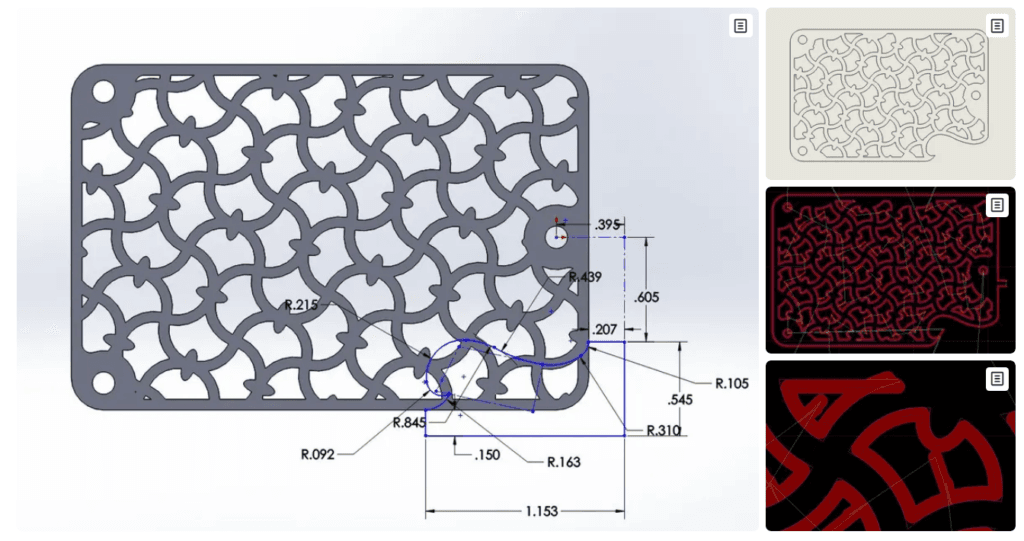
With laser, holes are usually straightforward. If the size fits the function, it will work. Small holes and dense patterns are normally not a problem.
With waterjet, you need to think a bit more. The hole cannot be too small, otherwise the jet simply cannot work properly. In thicker materials, holes may not be perfectly cylindrical, there will be some taper from top to bottom.
Also, if holes are too close to each other, the material between them may not survive the cutting process.
So designing holes is not only about dimension, but also about whether the jet can actually handle that feature.
2.2 Straight Lines
Laser gives you a very clean result. What you draw is very close to what you get.
Waterjet, especially in thicker material, behaves differently. The top surface is usually more accurate, while the bottom may have some deviation.
So when you design a straight edge, it’s important to think: which side really matters. If both sides are critical, then it’s not only a design issue anymore, it may require a different machine setup.
2.3 Curves
Laser follows curves very well, even complex shapes.
Waterjet has a small delay when changing direction. It cannot instantly follow tight curves, especially with thick materials. The smaller the radius, the more noticeable this effect becomes.
So it’s not that curves cannot be complex, but smoother transitions will always give better and more stable results.
2.4 Corners
With laser, sharp corners are common and easy to achieve.
With waterjet, sharp internal corners are physically limited by the nozzle size. You will always have a small radius.
If you design everything as perfect sharp corners, you may end up disappointed with the result. It’s better to accept this early and include reasonable radii in your design.
2.5 Distance Between Features
This is something many laser designers don’t pay much attention to.
Waterjet has a wider kerf. If two lines are too close, the cuts may overlap. This can lead to dimensional errors, or even cause small sections to break away completely.
So spacing between features is not just a drawing detail, it directly affects whether the part can be cut properly.
3. The Effect of Material Thickness
In laser cutting, one design can often work across different thicknesses, with parameter adjustments.
In waterjet, thickness changes everything. The thicker the material, the more energy loss in the jet, and the more deviation you will see.
That means the same drawing may behave very differently in thin and thick materials.
For thicker parts, it’s often necessary to allow more tolerance, or at least confirm compensation strategies before cutting.
4. Lead-in, Start Point and End Point
Lead-in is the path used to enter and exit the cutting contour.
Laser also uses lead-ins, but they are usually handled automatically and have minimal impact.
In waterjet, the start point is more critical. The jet needs to pierce the material first, and this can leave a visible mark.
If this happens on a functional edge or visible surface, it can be a problem.
So in practice, you should think about:
- placing the start point in a non-critical area
- leaving extra space if needed for lead-in
- defining safe zones for piercing on important parts
The exact length of the lead-in is not fixed, but it should be long enough for the cutting process to stabilize before reaching the main contour.
5. 3-Axis vs 5-Axis
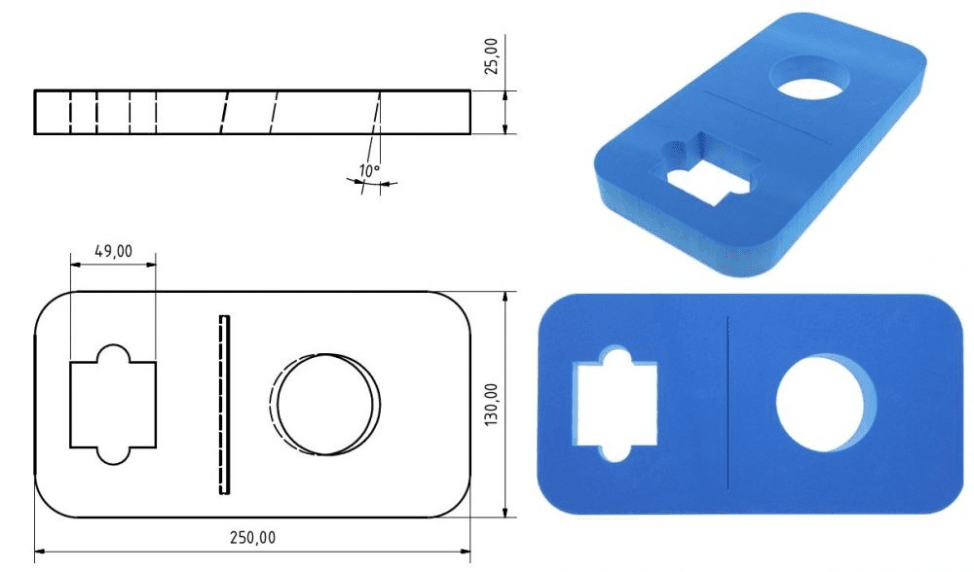
3-axis waterjet cuts vertically. Taper is unavoidable, and design usually needs to adapt to it.
5-axis adds angle control. It can compensate taper and even create angled cuts.
From a design point of view, the difference is quite clear:
With 3-axis, you are often avoiding problems.
With 5-axis, you start controlling the result.
But even with 5-axis, design is still connected to process. It just gives you more flexibility, not complete freedom.
If you have more questions about waterjet cutting ,please feel free to comment below or contact APW who plays and produces waterjet 30 years .
FAQ
1. Can I use the same drawing from laser cutting directly for waterjet?
In some simple cases, yes, you can use same drawing. But if the part has small holes, tight spacing, or thick material, then usually not so ideal.
Laser cutting drawing is more “clean geometry”, but waterjet needs to consider cutting behavior. If you just copy the file, maybe it can cut, but quality not stable.
Normally we will suggest small adjustment, not big change, but important for result.
2. Why my holes look good in laser cutting, but not good in waterjet?
This is quite common.
Laser cutting is using heat, so small holes still can keep good shape. But waterjet is physical erosion, jet has diameter and also some spread.
Especially in thick plate, hole top and bottom will be a little different. Not really perfectly straight.
If hole is too small or too close, problem will be more obvious. So for waterjet, hole design need more consideration.
3. Why edges from waterjet are not as straight as laser cutting?
It depends on thickness.
In thin material, waterjet edge also very good. But when material becomes thick, jet energy reduces when going down, so bottom side may have some deviation.
Laser cutting does not have this issue so much.
So when design, better to know which side is important. If both sides need high precision, maybe need 5-axis or secondary process.
4. Do I need to design lead-in like in laser cutting?
Laser cutting also has lead-in, but many times system will handle automatically, so designer not care too much.
For waterjet, start point is more sensitive. Because first need piercing, and this may leave mark.
If this mark is on sealing surface or visible edge, then not good.
So even if you don’t draw lead-in in CAD, at least you should think where is better start point. Sometimes we also discuss this before cutting.
5. Is waterjet always less precise than laser cutting?
Not exactly.
For thin sheet and very fine features, laser cutting is usually more precise, this is true.
But waterjet has advantage in thick material, no heat affected zone, no thermal deformation.
Also with 5-axis, some accuracy issues like taper can be controlled.
So it’s not simply more or less precise, it depends on application. Choosing correct process is more important than only looking at precision.